Tutorials
GPT-6 Astra Ad Prompts: From Product Facts to a Four-Panel Brief
A copy-ready prompt and fictional product example for turning product facts into a concise four-panel ad brief, then refining it in Panelly.
Make it with Panelly
Turn inspiration into your next product ad
Bring a product image and an idea. Create a four-panel ad, a coordinated asset set, or a video with Panelly.
Create with Panelly Edit the brief before you generate.
A product page can give you a name, dimensions, materials and a list of features. It rarely tells you which moment should open an ad, what the close-up needs to show, or how much information belongs in the final frame. Useful GPT-6 Astra ad prompts turn that pile of information into a small set of creative decisions.
If you already use Astra, give it the job of preparing a brief you can bring into Panelly: one product, one supported selling point, one audience and four connected panels. You can also enter those facts directly in Panelly. The extra drafting step is useful when your source material is long or your creative direction is still unsettled.
Give Astra a clear deliverable
Ask for a short advertising brief, not an open-ended campaign. “Make a great ad for my cup” leaves the model to choose the customer, benefit, setting, visual style and next action at once. A more useful assignment specifies what the finished brief must contain and what the model should ask about instead of guessing.
OpenAI documents GPT-6 Astra with text and image input, text output, and support for tools including image generation. This article uses it for the text brief; image tools available in an app are a separate part of that setup. OpenAI model documentation.
The workflow here is a copy-and-paste handoff. Prepare the brief in the Astra interface you already use, then bring the finished text and your product references into Panelly Studio.
Separate product facts from creative choices
Start by identifying what must remain true. A product's capacity, finish and visible components belong in the fact set. A warm morning scene, a close camera angle and a quieter background are creative choices. Keeping those categories separate makes it easier to change the ad without accidentally changing the product.
For this tutorial, imagine a fictional cream-colored travel cup with a matte body, a stainless-steel rim, a 450 ml capacity and a carry handle on its lid. Its supplied selling point is: “A carry handle on the lid for everyday carrying.” The audience is people commuting by train and working at a desk. The call to action is “See product details.”
Those facts do not establish that the cup is leak-proof, dishwasher-safe or insulated for a particular number of hours. A photograph may help describe its shape, but it cannot establish those performance claims either. If an important detail is missing, ask for it or leave it out.
The cup and the finished brief below are editorial teaching examples, not a recorded Astra test or a customer campaign.
Copy this prompt and replace the product details
Use the following request as a starting point. Replace the sample product and selling point with your own information before running it.
The drafting prompt
Help me prepare one static four-panel product ad. Return one concise paragraph that I can paste into Panelly, followed by four short panel descriptions. Before drafting, ask one focused question if the product, supported selling point or intended audience is missing. Do not fill those gaps with invented facts.
The example product is a cream-colored, 450 ml travel cup with a matte body, a stainless-steel rim and a carry handle on its lid. Preserve those details. The supplied selling point is exactly: “A carry handle on the lid for everyday carrying.” Do not add insulation duration, leak-proof performance, discounts, certifications or other benefits.
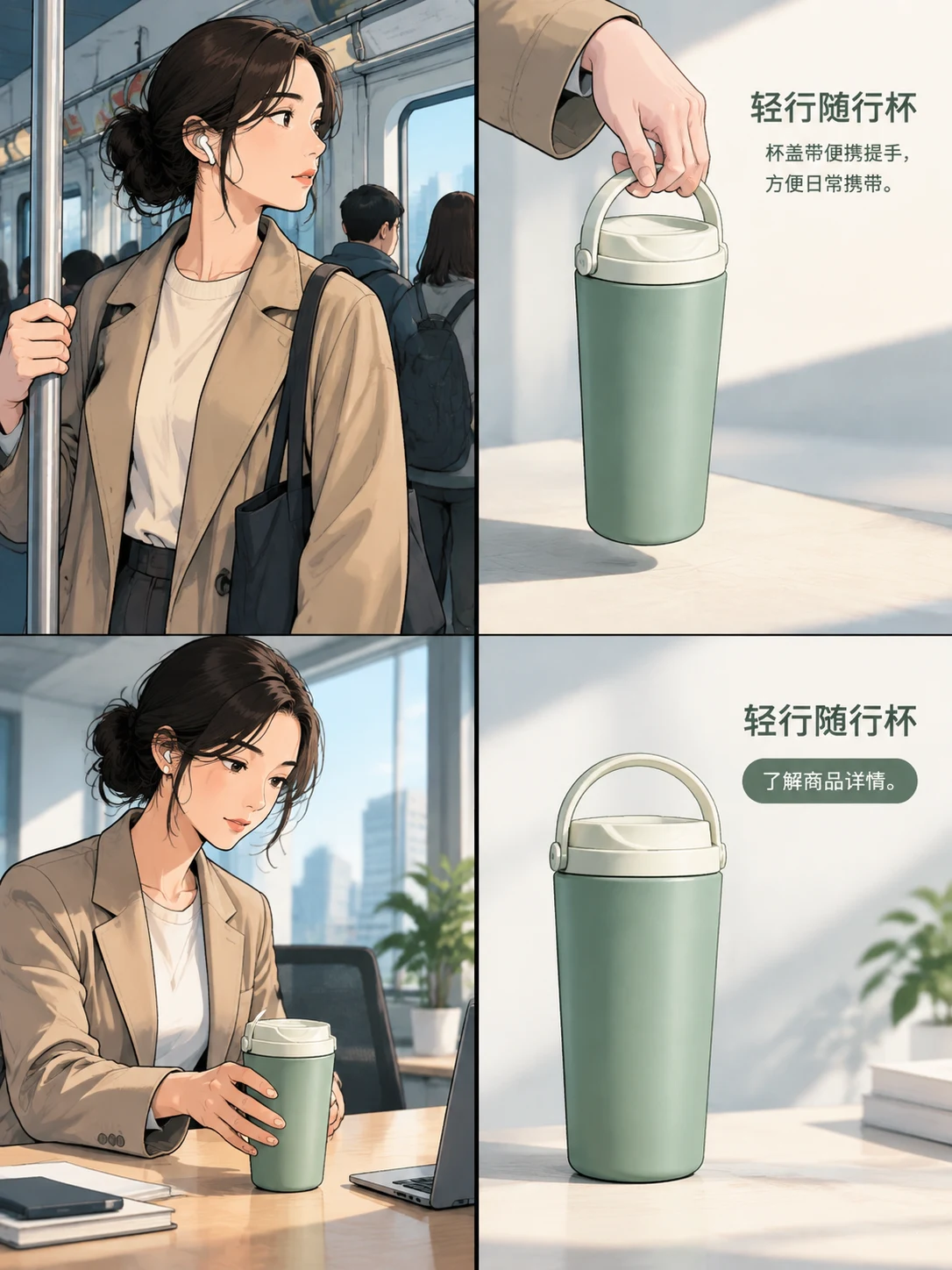
The audience is train commuters who also keep a cup at their desk. Plan a 3:4 image with four panels in a 2 × 2 grid: an opening commute moment, a close-up that makes the handle clear, use at a desk, and a closing product view with “See product details.” Use a warm illustrated style, gentle morning window light and uncluttered product close-ups. Keep the cup's proportions, cream color and material finishes consistent.
Keep the paste-ready paragraph separate from your planning notes. Describe visible actions and framing. Do not turn the four panels into four unrelated concepts, add a second call to action, or present optional visual ideas as product facts.
Why specify the response format?
The paragraph is the handoff. The four descriptions let you inspect the advertising sequence before creating an image. Keeping them separate prevents a long explanation of creative strategy from becoming part of the generation request.
If the model offers three campaign directions, choose one before moving on. Combining all three usually creates competing settings and visual instructions in the same brief.
What a finished handoff can look like
For the fictional cup, an editorially prepared brief could read:
Create a static four-panel ad for a cream-colored 450 ml travel cup with a matte body, stainless-steel rim and carry handle on its lid. Address train commuters who also use a cup at their desk. Keep the selling point exactly “A carry handle on the lid for everyday carrying.” Open with a commuter holding the cup by its handle, then show a clear handle close-up, place the same cup beside everyday desk items, and finish with a clean product view and “See product details.” Use a warm illustrated style and gentle window light throughout. Keep the shape, color and finishes consistent; do not add performance claims or promotional offers.
Each panel has a different job. The opening shows a recognizable context. The close-up makes the supplied feature visible. The desk scene connects the product to another moment in the same audience's day. The final panel gives the viewer a clear next step.
That is an advertising sequence, even when the images have a comic style. It does not need a separate plot, a dramatic transformation or a new claim in every frame.
Bring the brief into Panelly
Open the creative studio and paste the finished paragraph into the conversation. Add a product reference when you have one, and describe the details that should remain recognizable: the handle's position, the outline of the lid, the package color or the location of a label.
Choose the 3:4 canvas using the format control beneath the conversation. Keep the four-panel arrangement in mind when judging the result: a useful close-up must still be readable at its share of the finished image. Long copy that works in a document can become cramped inside one panel.
Keep your source facts nearby while reviewing the generated image. If a new benefit or an altered component appears, describe that specific mismatch in the conversation. Repeating the original brief without identifying the mismatch gives the next attempt less useful direction.
Revise the visual, not the whole campaign
“Make it more premium” can change several things at once: the palette, setting, materials and even the product's shape. A revision is easier to judge when it names what stays and what changes.
For the cup example, try:
Keep the cup's proportions, matte cream body, metal rim, carry handle, panel sequence and CTA unchanged. In the product close-up, simplify the background to warm cream, soften the main light and use a restrained highlight on the metal rim. Keep the body matte and the selling point unchanged.
This gives you observable details to check. Is the background simpler? Is the rim highlighted without making the whole cup glossy? Has the same handle survived? These are useful creative checks; they are not evidence that the ad will perform better.
Save larger changes for a separate version. Changing the audience from commuters to hikers, for example, changes the creative problem and may require new product facts. It should not be hidden inside a request for a different mood.
Leave with one brief you can actually use
Before generating, read the handoff once as someone who has never seen the product page. It should identify the product, the supported reason to notice it, a concrete usage context and one next action. The visual direction should help show those things rather than compete with them.
Use Astra to make those decisions explicit, then carry the concise result into Panelly. A useful brief is complete enough to guide the image and short enough that its main idea remains obvious.