Tutorials
Product Variant Ads: Stop Mixing Colors, Sizes and Offers
Keep each product variant paired with its real size, label and offer. Use a two-cup example, a reference map and a complete revision prompt.
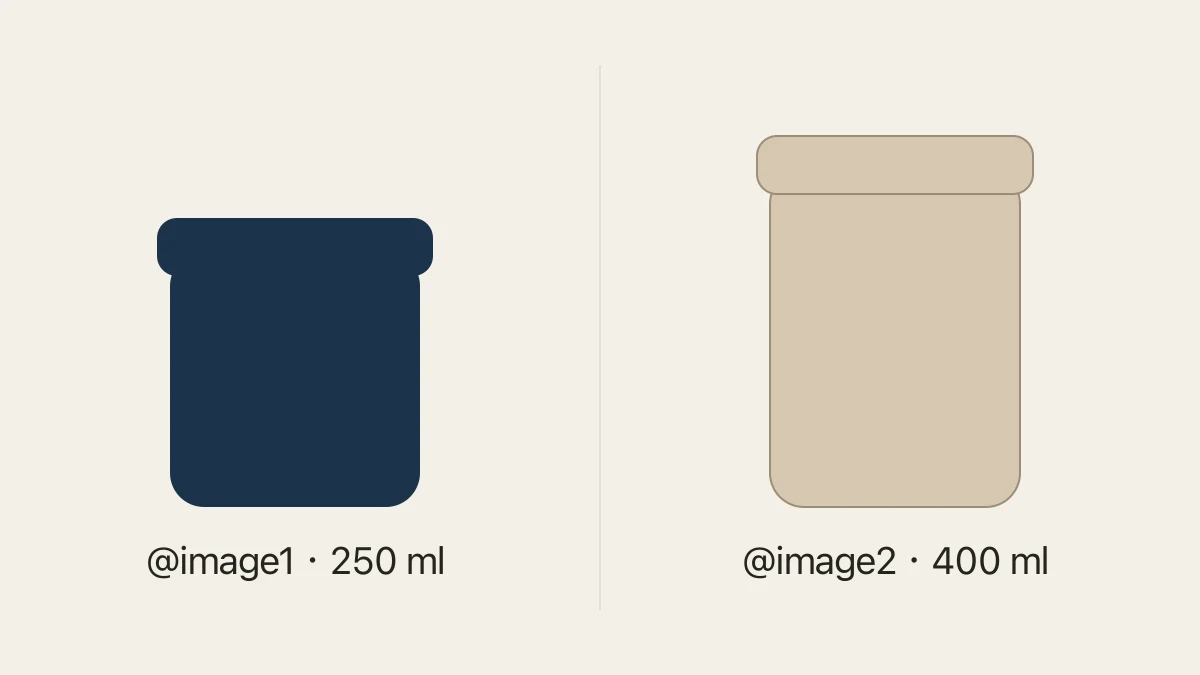
An ad can show a convincing product and still advertise the wrong variant. Before approving an image, check the combination: color, size, label, included items and offer must all describe the same item. Comparing each detail separately is not enough if the final image combines details from two different products.
The practical fix is a small variant map beside your references. Give each reference one identity, decide which variant the ad promotes, then check the finished image against that row. You can keep the headline and CTA inside the complete image.
For Shopping campaigns, Google recommends preselecting the matching variant on the destination page. Check that selection after opening the actual campaign link.
Build a map before asking for a scene
Here is a fictional cup example, not a tested campaign or a claim about a real product.
| Reference | Variant | Capacity | Distinguishing feature | Allowed offer |
|---|---|---|---|---|
| @image1 | Navy cup | 250 ml | Short body, navy lid | Discover the navy cup |
| @image2 | Cream cup | 400 ml | Taller body, cream lid | Discover the cream cup |
The capacity labels in this table are supplied product facts for the example. Do not infer capacity from apparent image size: separate photographs can use different camera distances. If the real product information is incomplete, leave that claim out until the seller supplies it.
A row is a bundle of facts, not a list of interchangeable options. A navy 400 ml cup would be a third product; it is not justified by having one navy reference and one 400 ml reference.
Decide whether the ad promotes one variant or a choice
For a single-variant ad, use the selected product as the main reference. If another picture is needed only for lighting, say so explicitly. See reference image roles for separating product identity from visual inspiration.
For a comparison ad, show both variants and pair each name with the correct product. Unless you know their relative dimensions, avoid presenting differently scaled cutouts as an accurate size comparison. Describe the capacities in copy using the supplied facts instead.
For a set, confirm what the customer actually receives. Two cups appearing together may be understood as a bundle. If customers choose one cup, write that clearly and avoid copy that suggests both are included. This differs from photographing an actual bundle.
Inspect combinations, not just attractive details
Check the final ad twice. First read it at the size people will normally see it: is the promoted variant obvious? Then inspect the product and text closely. A beautiful background should not distract from a wrong lid, changed capacity or offer assigned to the wrong item.
| What changed | Why it matters | Next request |
|---|---|---|
| Navy body with cream lid | The combination may not exist | Restore the lid from @image1 |
| 400 ml next to the short navy cup | Another variant's capacity was copied | Replace it with the supplied 250 ml fact |
| Both cups under one offer | The offer's scope is ambiguous | State which variant the offer applies to |
| Correct product, wrong destination | The purchase path changes the promise | Check the destination and variant selection |
The destination check is a manual campaign check; this article does not claim that Panelly verifies an external shop's inventory or selected variant.
Send one complete correction
In Panelly Studio, reference the product image and the current ad separately. Describe what should change and what should remain.
@image1 is the navy 250 ml cup we are promoting. @image2 is the current ad, not a second product reference. Keep its desk scene and composition. Restore the short navy body and matching navy lid from @image1. Remove the 400 ml claim and use 250 ml. Keep only this cup in the image. Include the headline “A little pause, in navy” and CTA “Discover the navy cup” in the finished ad. Do not borrow the cream variant's lid, proportions or offer.This is a proposed creative brief, not a guarantee of an exact edit. Compare the new output against the same row. If the lid is corrected but the label changes, the revision is still unfinished. Save the accepted version with the variant name so another export does not replace it accidentally.
Can one reference represent every color?
It can guide the general design, but it does not verify the appearance of an unphotographed color. Supply the correct variant reference when its appearance matters.
Does a correct capacity label prove the product is accurate?
No. Text and appearance can disagree. Check the complete combination, then confirm the ad and destination promote the same item.